
CybertronIT Blog
Cybertron Blog
Cybertron has been serving the Wichita area since 1997, providing IT Support such as technical helpdesk support, computer support, and consulting to small and medium-sized businesses.
The AI Scams Hitting Small Businesses, and the Rules That Stop Them

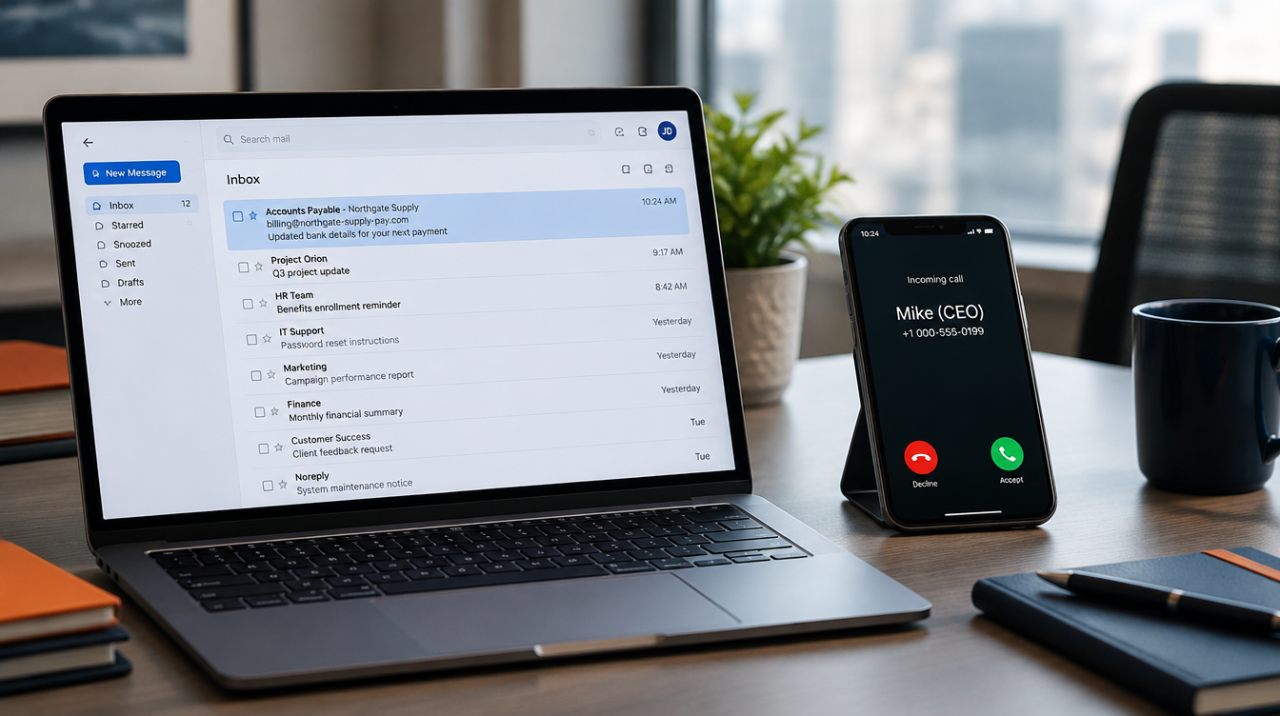
The scam that costs you money this year probably won't look like a hack. No malware, no alarm, no link to click. It'll look like a normal request from someone you trust. A voicemail from the boss. An invoice from a vendor you pay every month. An email that says the bank account changed. The job gets done the way it always gets done, and the money is gone before anyone thinks to check.
AI made these old tricks cheap and fast. A scammer used to need time and skill to fake a convincing voice or clone an invoice. Now a few seconds of audio from a voicemail greeting or a webinar clip is enough to copy someone's voice. A logo and a PDF are enough to rebuild your supplier's invoice line for line. The attack didn't get smarter. It got mass-produced.
A 2026 survey found that roughly half of small businesses reported a security incident in the past year. Microsoft reported catching more than a million fraudulent emails in a single three-day stretch this past August, many of them aimed at the people who pay the bills. Treat those numbers as direction, not gospel. The direction is clear enough: this is aimed at you, and it's aimed at the person who signs the checks.
Here's what the three plays look like, why they work on a business your size, and the handful of rules that shut the door. None of it requires buying anything today.
Why they come after small businesses
Big companies have an accounts-payable department, a two-signature policy, and a fraud team. You have a person. Maybe that person is you.
That's the whole appeal. A small business moves real money with less friction. The owner signs off fast because the owner is busy running the place. There's no separate desk whose only job is to question a payment. And the relationships are personal, so a request that sounds like it's from a familiar name gets handled, not interrogated. Attackers read your website and LinkedIn, figure out who approves payments and who reports to whom, and wait for a believable moment. Then they add urgency, because urgency is what turns a careful person into a fast one.
We're not immune to this either. We run accounts payable, payroll, and vendor wires across the businesses we operate, including import and export with partners who change their banking details for real reasons. So we field the same "please update our remittance info" emails your staff does. We know how ordinary the fake version looks, because the real version looks identical.
The three plays being run right now
Voice cloning. A scammer pulls a few seconds of someone's voice off a voicemail greeting, a social video, or a recorded webinar, and clones it. Then your bookkeeper gets a call. It's the owner's voice, stressed and in a hurry: wire this now, or go buy gift cards for a client, I'm about to walk into a meeting, don't let me down. "I recognized her voice" stopped being proof. The gift-card version sounds too small to be a real scam, which is exactly why it's chosen. Gift cards are fast, hard to reverse, and usually below the dollar amount that would trigger a second set of eyes.
Fake supplier invoices and business email compromise. This is the expensive one, because it rides a payment you were already going to make. The attacker either spoofs a supplier's email domain or, worse, gets into the supplier's real mailbox and watches a live invoice thread. Then a message arrives: same vendor, same invoice number, same layout, new bank account, please pay to this going forward. Nothing looks wrong because almost nothing is wrong. One field changed. The money lands in a criminal account and the real vendor calls a month later asking where their payment is.
Payment-redirect fraud. The close cousin. An email shows up that says, in so many words, "our banking details have changed, here's the new account for future payments." Sometimes it's a vendor, sometimes it's dressed up as payroll or a landlord. It may come from a lookalike domain you won't notice at a glance, or from a real account the attacker broke into. The point is always the same: reroute money that was heading somewhere legitimate into an account they control.
All three work for the same reason. There's nothing technically malicious to catch. No filter flags an email that's just a reasonable request, and no antivirus stops a phone call. These attacks target tired people doing normal jobs, which is why the fix isn't a product. It's a habit.
The rules that actually stop this
You don't need to out-tech the attacker. You need a few rules that don't bend for urgency, because urgency is the tool they're using against you.
Verify out of band, every time. Any request to send a payment, buy gift cards, or change bank details gets confirmed on a phone number you already have on file. Not the number in the email. Not the number in the signature. Not the callback number the caller gives you. The number you had before any of this started. This one rule breaks voice cloning, fake invoices, and payment redirects all at once, because the scammer controls the message but not the real vendor's real phone.
That includes the boss. This rule doesn't stop at vendors. When a message appears to come from the owner or a manager and asks for something out of the ordinary, a sudden wire, a batch of gift cards, a payroll change, a pull of employee W-2s, verify it the same way before acting, in person or on a known number. A real owner won't mind the check. An emailed "boss" is the easiest person in the company to impersonate, because staff don't want to question the person who signs their paycheck. Make it policy that extraordinary requests get confirmed no matter whose name is on them, so no one has to decide in the moment whether it's rude to ask.
Set a code word for money requests by voice. Pick a word or short phrase and share it with the handful of people who can approve or move money. If a call asks for a payment or a banking change, the right person can say the word. A cloned voice can copy how someone sounds. It can't know a word that was never said out loud online. It feels a little silly the first time. It works.
Require two people above a threshold. Pick a dollar amount that makes sense for your business. Any payment above it, and any change to a vendor's banking details at all, needs a second person to approve. Splitting the decision across two people defeats the whole model, which depends on getting one busy person to act alone. This costs nothing but a few minutes and a little discipline.
Treat urgency as the warning sign, not the reason to hurry. Real vendors and real coworkers can wait ten minutes for a callback. "Do it now, don't tell anyone, I'm unreachable" is not how legitimate business talks. It's the script. When a request leans hard on speed and secrecy, that pressure is the tell. Slow down exactly when you're being pushed to speed up.
Those four are free. Here are the technical backstops that make them stronger, and these are where a managed setup earns its keep:
- Turn on multi-factor authentication everywhere, especially email. It's the single biggest barrier to someone getting into a mailbox and running the invoice trick from the inside. Prefer an app or a security key over text-message codes.
- Lock down your email with SPF, DKIM, and DMARC. These are authentication records that make it much harder for a scammer to spoof your own domain, and they help your staff trust that internal-looking mail is actually internal. Most small businesses we audit have these missing or set to monitor-only, which watches the spoofing happen and does nothing about it.
- Run short, regular awareness drills. Not a once-a-year video nobody remembers. A quick, realistic test now and then, built around these exact scams, keeps the habit alive. Your best firewall is a staffer who pauses and makes the call.
If you only do three things
Start here this week. These three stop most of it:
- Put a callback rule on every payment and banking change, verified to a number you already have, never the one in the message.
- Set a code word for any money request that comes in by voice.
- Turn on multi-factor authentication on email and every account that offers it.
Give your team permission to push back
Most of these scams succeed because an employee doesn't want to look difficult or slow by questioning the boss or a familiar vendor. Take that worry off them. Tell your staff, out loud, that pausing to verify a payment is doing their job right, and that no real request from you will ever suffer for a ten-minute check.
Give them a line they can use without feeling rude:
"Our policy is to confirm any payment or banking change by phone before it goes out. I'll call you right back on the number we have on file."
That sentence is polite, final, and scam-proof. A real vendor will respect it. A real boss will be glad you said it. A scammer will hang up.
The honest bottom line
AI didn't invent these scams. It made them cheap, fast, and convincing enough that your own eyes and ears aren't reliable anymore. The defense is old-fashioned and it holds: verify on a known number, use a code word for voice requests, split big payments across two people, and treat urgency as a reason to slow down. Back it with MFA, real email authentication, and a team that knows the pause is part of the job.
This is exactly the kind of thing a managed setup is supposed to handle in the background: email authentication configured correctly, MFA turned on across the board, and staff training that's tuned to the scams actually being run. If you want a straight read on where these gaps sit in your business, book a call and we'll walk your setup on a screenshare.
FAQs
Can someone really clone a voice from a few seconds of audio?
Yes. The tools are widely available and cheap, and a short clip from a voicemail greeting, a social video, or a recorded call is enough. That's why "I recognized the voice" is no longer proof of anything. For money requests by phone, use a code word that was never shared online.
What's the single most effective thing we can do?
Put a callback rule on every payment and every banking-detail change, verified to a phone number you already have on file, never the number in the email or the one the caller gives you. It's free, it takes an afternoon to write into your process, and it stops all three of these scams at once.
We're a small team. Isn't dual approval overkill?
Pick a threshold that fits you. The point isn't to slow down every coffee-run reimbursement. It's to make sure the big wires and any change to a vendor's bank account need a second set of eyes, because the whole scam depends on getting one busy person to act alone.
We already use multi-factor authentication. Are we covered?
It's a big help and worth doing everywhere, especially on email. It's not the whole answer, because these scams often don't need to break into an account at all. A cloned voice on the phone and a spoofed invoice both work without touching your login. MFA plus the verification habits above is what actually holds.
Money already went out. What now?
Move fast. Call your bank immediately and ask them to try to recall the transfer, and report it to the FBI's Internet Crime Complaint Center at ic3.gov as soon as possible, because quick reporting sometimes allows a wire to be clawed back. Then figure out how it happened and close that gap before they try again.
Comment for this post has been locked by admin.
Comments
No comments made yet. Be the first to submit a comment

© 2026 CybertronIT. All rights reserved.Privacy Policy · Sitemap