
CybertronIT Blog
Cybertron Blog
Cybertron has been serving the Wichita area since 1997, providing IT Support such as technical helpdesk support, computer support, and consulting to small and medium-sized businesses.

The gap between businesses running on current technology and those clinging to old systems that once served them well can be stark. And it is not only about avoiding the slow decline of outdated tools. It is about what you actively gain when your technology is current. Staying up to date is less about keeping up and more about unlocking what your business can do. Here is the real upside.
More Gets Done, Together
Modern tools clear the friction out of the workday. They take over repetitive tasks, speed up the work that used to drag, and let your team collaborate easily whether everyone is in the office or spread across locations. Shared cloud platforms and good project software mean fewer bottlenecks and less time lost to clunky processes. The result is simple: your people spend more of their day on work that matters and less on fighting the tools.
Stronger Security
Current technology is safer technology. Modern systems get security updates, support today's protections, and stand up to threats that did not exist when older tools were built. Staying current is one of the most effective things you can do to keep attackers out, because the alternative, running software past its support date, leaves known holes wide open. Up to date is not just faster. It is far harder to break into.
Better Service for Your Customers
Your technology shapes what your customers experience, even when they never see it. Faster systems mean quicker responses, fewer errors, and smoother transactions. The right tools help you understand what customers need and deliver it without the delays and hiccups that send people to a competitor. In a lot of markets, the quality of that experience is the whole ballgame.
Room to Grow and Adapt
Current technology gives you agility. When an opportunity appears or the market shifts, a modern, flexible setup lets you move on it. An aging one holds you in place, forcing you to say no to things you could otherwise do. Keeping your tech current keeps your options open, which is worth a great deal when conditions change faster every year.
Progress on Purpose
None of this means chasing every new release or replacing things that still work well. It means keeping the capabilities your business runs on current, deliberately, so you capture the upside without wasting money on hype. Done right, modern technology is not a cost. It is one of the better investments you can make in the business.
Helping organizations use technology to seize opportunities, not just solve problems, is exactly what we do. We keep your systems current, secure, and matched to where you are going. If you want your technology working for your growth instead of against it, we can help.
0 Comments

Technology runs through almost everything your business does, from working on projects to dealing with clients. How your people handle that technology shapes how secure and efficient the whole company is. The good news is that most of security comes down to a few simple habits, and anyone can build them. Here are four every employee should make part of the workday.
Protect Your Digital Keys
Your passwords are the keys to your accounts, and to the company's. A weak or reused password is the front door left unlocked. The habit is straightforward: use strong, unique passwords for every account, lean on a password manager so that is actually doable, and turn on multifactor authentication wherever it is offered. That extra step means a stolen password alone is not enough to get in.
Stay Alert for Deception
Most attacks start by tricking a person, not by breaking a system. A convincing fake email, a text pretending to be the boss, a call that is not really the bank. The habit here is a healthy pause. Before clicking a link, opening an attachment, or acting on an urgent request, especially one involving money or data, stop and verify it is real. Slowing down for two seconds defeats a huge share of attacks.
Keep Software Current and Approved
Those update reminders are not just nagging. They often carry security fixes for holes attackers already know about. The habit is to install updates promptly instead of dismissing them, and to stick to software the company has approved. Random downloads and unapproved apps are a common way trouble gets onto a network.
Handle Information With Care
Be thoughtful about company and customer data. Do not send sensitive information over unsecured channels, do not leave it visible on an unattended screen, and only share it with people who actually need it. Treating data like it matters, because it does, prevents the quiet leaks that cause real damage.
Small Habits, Big Protection
None of these takes special skill. They take consistency. When every person on the team builds these four habits, your business gets dramatically harder to attack, because the most common ways in are already closed. Security is a team sport, and your people are the first line.
We help businesses turn these habits into second nature with training and the right tools behind them, as part of managed cybersecurity. If you want your whole team pulling in the same direction on security, book a call and we will help you build it.

Every so often a very public moment shows exactly why basic security matters everywhere, not just in IT departments. The 2025 NFL Draft was one of those moments. Several prospects got prank calls during the draft, and one in particular is a clean lesson for any business. Let us walk through it.
It Started With an Unlocked Tablet
Quarterback Shedeur Sanders received a prank call live on stream from someone impersonating an NFL general manager. How did the caller get his private draft number? It was found on an unlocked iPad at a coach's home, jotted down by a family member, and used for the prank. The NFL took it seriously, fining the team 250,000 dollars and the coach 100,000. One device left unlocked, one number left visible, and it became a national story with real consequences.
Why This Is a Business Problem Too
Swap the iPad for a laptop and the phone number for a client list, a password, or a wire instruction, and this is a Tuesday at a lot of companies. The exact same chain of small failures plays out in offices constantly. Three lessons stand out.
Limit Who Can See What
This is the principle of least privilege: people, and devices, should only have access to the information they actually need. That sensitive number should never have been sitting in the open on a device a visitor could pick up. In your business, the fewer people and screens that can reach your sensitive data, the smaller the chance it walks out the door by accident.
Lock Things Down
An unlocked device is an open filing cabinet. Screens should lock automatically, accounts should require real authentication, and sensitive systems should sit behind multifactor authentication so a glance over someone's shoulder is not enough to get in. Simple habits, enforced consistently, close the door this whole incident walked through.
Recognize Impersonation for What It Is
The call worked because someone pretended to be a person of authority. That is social engineering, the same trick behind most phishing, and it does not only come by email. It is the fake call from the bank, the urgent text from the boss, the message from a vendor that is not really the vendor. Train your people to verify before they act, especially when a request is urgent or involves money or data.
Avoid the Same Mistake
A prank during a football draft is harmless compared to what the same lapses cost a business: a drained account, a data breach, a lost client. The fixes are not complicated. Limit access, lock devices, verify identities. The hard part is doing them consistently, which is where most organizations slip.
That consistency is what we provide. We build least privilege, strong authentication, and phishing awareness into how our clients operate as part of managed cybersecurity, so a small lapse does not turn into a headline. If you want to make sure your unlocked-iPad moment never happens, book a call.

We have all heard it, maybe even rolled our eyes at it: have you tried turning it off and on again? It is the running gag of IT support. But under the joke is a real truth. Rebooting a device is genuinely the most effective first step for a surprising number of problems, and there is solid logic behind it. Here is why it works, and when it is telling you something more.
The Logic Behind the Reboot
While a device runs, it is juggling hundreds of small tasks in memory at once. Programs open and close, processes pile up, temporary files accumulate, and bits of software occasionally get stuck or conflict with each other. Over time these small snags add up and things start misbehaving. A restart clears all of that out. It dumps the cluttered memory, closes everything that was running, and lets the system start fresh with a clean slate. Most of the time, whatever was tangled up simply gets untangled.
More Than Just a Joke
The reason IT professionals ask first is not laziness. It is efficiency. A huge share of everyday glitches, the frozen app, the printer that will not respond, the connection that dropped, the program running slow, come from exactly the kind of temporary mess a reboot resolves. Starting there fixes the problem in two minutes a large percentage of the time, instead of spending an hour digging for a complicated cause that was never there.
The Business Case for the Restart
For a business, this is real time saved. Teaching your team to try a restart first means a lot of small issues get solved on the spot, without a support ticket and without anyone losing half a morning. It is the cheapest, fastest troubleshooting step there is, and it works often enough to be the right first move nearly every time.
When a Reboot Is Not Enough
Here is the important part. If you are rebooting the same machine over and over to keep it working, the restart has stopped being a fix and started being a symptom. A problem that keeps coming back points to something deeper: failing hardware, a software conflict, a misconfiguration, or even a security issue. That is the signal to stop rebooting and get someone to find the root cause, before the small recurring annoyance becomes a real failure.
Knowing the difference between a quick fix and a warning sign is a big part of what good IT support does. We handle the problems a reboot cannot, and we watch for the patterns that say something needs real attention. If the same issues keep coming back no matter how many times you restart, that is worth a look.

October 14 will be here before you know it, and when it arrives, Windows 10 reaches its end of life. After that date, Microsoft stops issuing security updates for it. Without expensive special arrangements, every new threat that comes along will have nothing standing in its way. If your business is still on Windows 10, moving to Windows 11 needs to be near the top of your list, and the sooner the better.
The Stakes Are High
End of life is not just a label. It means the patches stop. Right now, when a flaw is found in Windows 10, Microsoft fixes it. After October 14, those fixes end, and every vulnerability discovered from then on stays open forever. Attackers know these dates better than anyone, and unsupported systems become prime targets. A computer running an unsupported operating system is one of the easiest ways into a network, and from there, into everything else you run.
Why You Need to Start Now, Not Later
It is tempting to wait until the deadline is breathing down your neck. That is a mistake, for two reasons. First, Windows 11 has stricter hardware requirements than Windows 10, so some of your machines may not be able to run it as-is. You need time to find out which ones, and to plan for the ones that need replacing. Second, a rushed migration across a whole business is how things break and data gets lost. Done early and deliberately, the move is smooth. Done in a panic the week of the deadline, it is a scramble.
This is also a good moment for an honest look at your hardware. Some machines will upgrade cleanly. Others have genuinely aged out and are due for replacement anyway. Knowing the difference, and not throwing out gear that still has good life in it, is exactly the kind of call worth getting right.
We Can Help, Whatever Your Situation
Whether your machines are ready for Windows 11, need a few adjustments, or are due for replacement, there is a clear path forward, and getting ahead of October 14 makes all the difference. We handle migrations like this for businesses, from checking which machines qualify to planning the rollout so nobody loses a day of work, and we build and run the hardware for the ones that need replacing. If you are still on Windows 10, book a call and we will map out your move before the deadline forces your hand.
CybertronIT is proud to announce the launch of our new website at cybertronit.com. The goal of the new website is to make it easier for our existing clients to submit and manage support requests, and provide more information about our services for prospective clients.
Kurt Vonnegut once called new knowledge "the most valuable commodity on earth." Twenty-first century business has taken him at his word. As the internet grew, so did the number of companies collecting data and the market for selling it. Some of the largest, most profitable companies in the world, names like Google, Apple, Amazon, Microsoft, Meta, and the big telecoms, make enormous sums not just from products but from data. Whether or not data is a commodity, one thing is clear for your business: it is an asset, and assets need protecting.
Why Data Is Worth So Much
Data gets collected, bought, and sold every year, and it is big business. Consider that a company like Meta earns tens of billions in profit annually, the vast majority of it from advertising built on what it knows about its users. That is the clearest possible signal of how valuable data has become. If having people's data is worth that much to the giants, it tells you something about the value of the data sitting in your own systems, your customer records, your financials, your operations.
Valuable to You Means Valuable to Attackers
Here is the flip side. Anything that valuable is a target. Attackers want your data because they can sell it, ransom it, or use it to impersonate you and your customers. Phishing remains one of the most common ways they go after it, and it is a frequent delivery method for malware and ransomware. The same data that gives your business an edge becomes a liability the moment it is not protected, which is exactly why treating it like the asset it is matters so much.
How to Protect the Asset
Protecting your data is not one product. It is a layered, ongoing effort: keeping systems patched so known holes stay closed, requiring strong authentication so a stolen password is not enough, backing your data up so it survives an attack or a failure, and training your people to spot the tricks that target it. Behind all of that, real protection means someone watching your network and infrastructure around the clock, so threats get caught early instead of after the damage is done.
That is the work we do. We treat our clients' data like the asset it is, with layered, around-the-clock cybersecurity built to keep it safe and recoverable. If your business runs on data, and every business does now, book a call and we will make sure it is protected like the asset it is.

For a small business, the technology you choose can shape your margins, and for a brand-new company it can be the difference between a strong start and a rough one. One of the biggest infrastructure decisions you will make is where your computing lives: in your own building, in the cloud, or some mix of both. It is genuinely a cost decision, and the honest answer is that neither option wins automatically. Here is how they actually compare.
The On-Premises Model
Running your own infrastructure means buying the hardware, the servers, storage, and networking gear, and housing it yourself. That is a real upfront investment, a capital expense you make once and then own. In exchange you get full control, fast local performance, and a clear home for data that has to stay on-site for compliance. Over a long enough horizon, owning gear you use heavily and predictably can cost less than renting equivalent capacity month after month. The trade-off is that you are responsible for maintaining, securing, and eventually replacing it.
The Cloud Model
The cloud flips the math. Instead of buying hardware, you rent capacity as a service and pay over time, an operating expense rather than a capital one. That means little upfront cost, easy scaling, and a lot of the maintenance handled for you. It is excellent for workloads that change, spike, or are hard to size in advance. The catch is that the meter never stops, and convenient scaling makes it easy for monthly costs to climb past what you expected if nobody is watching.
The Costs Nobody Puts on the Spreadsheet
The headline numbers are only part of the picture. Migrating to the cloud takes time and money of its own. Uptime guarantees sound great until you read what they actually promise. Estimating cloud costs accurately is genuinely hard, because usage is hard to predict. And both models carry security responsibilities, just different ones. Whoever designs your setup, your architect, needs to account for all of it honestly, not just the sticker price.
The Hybrid Answer
For a lot of businesses, the right answer is not one or the other. It is both. A hybrid approach puts each workload where it actually belongs: predictable, control-sensitive, or compliance-bound systems on hardware you own, and variable or fast-scaling workloads in the cloud. Done well, you get the strengths of each and limit the weaknesses of both. It takes thoughtful planning to manage, but the tools and practices for running hybrid well keep getting better, and it is increasingly the most cost-effective way to run a growing business.
The thread through all of it is the same: controlling your computing costs, on any platform, takes careful, deliberate planning rather than a default choice. Because we design, build, and run both on-premises hardware and cloud environments ourselves, we can give you a straight, balanced read on where each part of your infrastructure belongs, and the security to match. If you are weighing cloud against on-premises, book a call and we will run the real numbers with you.

Whatever the critics say, regulations exist for a reason, usually to protect people from organizations cutting corners with their data. Many are actual laws, and the ones built around data protection govern how you handle and safeguard sensitive information. If your industry is covered by them, compliance carries very real, very visible costs. Ignoring those costs does not make them go away. It just changes who pays and how much. Here is how to think about your compliance burden and plan for it.
Compliance Is Not Cheap
There is no point pretending otherwise. Meeting regulatory requirements takes time, tools, expertise, and ongoing effort, and that is true whether you are dealing with HIPAA in healthcare, PCI for payment data, or one of the broader data-protection regimes. The burden also lands unevenly. Smaller organizations often pay disproportionately more per employee than larger ones, because the fixed costs of compliance get spread across fewer people. For a small business, compliance can take a meaningful bite out of the IT budget.
Non-Compliance Costs Far More
Here is the number that reframes the whole conversation. The Ponemon Institute's widely cited research on the cost of compliance found that the average cost of staying compliant ran about 5.5 million dollars for the enterprises studied, while the average cost of non-compliance was roughly 14.82 million. In other words, compliance came in at about a third of what non-compliance cost. Skipping the work does not save you money. It defers a much larger bill, made up of fines, breach cleanup, legal exposure, and lost business, until the worst possible moment.
Those figures are from large enterprises, but the ratio holds at every size: doing it right is cheaper than getting caught doing it wrong.
Plan for It Instead of Reacting to It
If you are going to spend real money on compliance anyway, the smart move is to treat it as a planned, ongoing part of how you operate, not a fire drill you scramble through when an audit looms or a breach forces the issue. That means knowing exactly which regulations apply to you, understanding what they actually require, building those requirements into your systems and habits, and keeping current as the rules change. Done that way, compliance becomes a manageable line item. Done reactively, it becomes a crisis with a penalty attached.
Knowing your obligations and building toward them steadily also turns compliance from a pure cost into something closer to an asset, the proof to customers and partners that their data is safe with you.
We help regulated businesses understand exactly what applies to them and build toward it deliberately, as part of our compliance services and the security underneath them. If you are not sure where your business stands on its compliance burden, book a call and we will help you map it before it maps you.

How much does your business depend on technology to keep running? For most, the honest answer is completely. As that technology gets more complex, more companies want a full IT department to manage it, but a small business rarely has the budget to staff one. That is the gap managed IT fills. Instead of waiting for things to break and paying for emergency fixes, a managed service provider keeps your technology running and heads off problems before they hit. Here are four ways that pays off.
Flexibility You Can Count On
Your needs change. Some months are quiet, others you are growing fast or taking on a big project. A managed provider scales with you, adding support and capacity when you need it and dialing back when you do not, all for a predictable monthly cost. You get the right level of IT for where you are right now, without hiring and firing to match.
Backup for Your In-House Team
If you already have someone handling IT, a managed provider does not replace them, it backs them up. Your internal person gets to focus on the projects that move the business forward while the provider handles the routine monitoring, maintenance, and after-hours coverage. For a one-person IT shop, that is the difference between drowning and getting ahead. And it means the work does not stop when your person is out sick or on vacation.
Dealing With Your Vendors
Anyone who has spent an afternoon on hold with a software or hardware vendor knows how much time it eats. A managed provider takes that off your plate, acting as the single point of contact who deals with your technology vendors for you. One call to us instead of five calls to five companies, and your team gets their day back.
A More Efficient Operation
This is where it all adds up. Systems that are monitored and maintained run faster and break less. Problems get caught early instead of becoming outages. Your people spend their time on real work instead of fighting their tools or waiting for a fix. The cumulative effect is a business that simply runs smoother, which shows up directly in what you get done and what it costs you.
That is the heart of what we do. We give small and midsize businesses the IT muscle of a full department, the flexibility, the coverage, the vendor wrangling, and the day-to-day care, for a fraction of the cost of building it in-house, with security built in. If your technology is more headache than help, book a call and we will show you what managed IT can do.
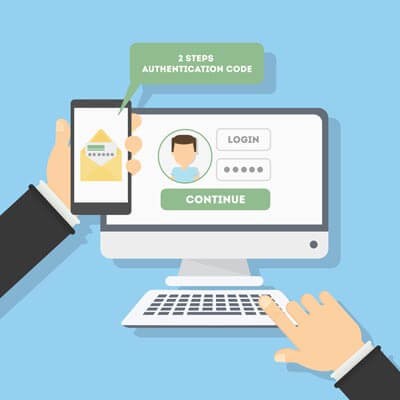
The password is not the protection it once was. Attackers now use software that guesses thousands of passwords a second, brute-forcing their way into accounts faster than ever, and they buy stolen passwords by the millions from old breaches. Relying on a password alone to guard your business is a losing bet. The fix is two-part: better passwords, and a second factor behind them. Here is how to do both.
Start With Better Passwords
Passwords still matter, so get them right. A strong one is long and complex, a mix of letters, numbers, and symbols, and not a word or date anyone could guess. Just as important, every account needs its own unique password. Reusing one across sites means a single breach hands attackers the keys to everything. Nobody can remember dozens of strong, unique passwords, which is exactly what a password manager is for. It generates and stores them so you only have to remember one.
Then Add a Second Factor
Here is the part that changes the game. Two-factor authentication, also called multifactor authentication, requires a second piece of proof beyond your password, usually a code from your phone or an app. The beauty of it is simple: even if an attacker steals or guesses your password, they still cannot get in without that second factor sitting in your pocket. It turns a stolen password from a disaster into a non-event, and it blocks the overwhelming majority of account-based attacks.
Turn It On Everywhere
The good news is that two-factor authentication is widely available and usually free. Most email, banking, and business apps support it, you just have to switch it on. The few extra seconds it adds to a login are nothing compared to the cleanup after a compromised account. Turn it on everywhere it is offered, starting with email and anything that touches money or sensitive data.
The Easiest Big Win in Security
Of all the things you can do to protect your business, combining strong, unique passwords with two-factor authentication is one of the cheapest and most effective. It closes off the single most common way attackers get in. If you have not turned it on across your accounts yet, that is the move to make this week.
We help businesses roll out strong authentication everywhere it counts, the right way, as part of managed cybersecurity, so it actually gets used instead of skipped. If you want to lock down your accounts before someone tests them, book a call.

Data security is not something to take lightly, as plenty of businesses have learned the hard way. The frustrating part is how many serious breaches trace back to simple, fixable mistakes. They are common enough that not fixing them is genuinely foolish. Let us look at one of the most infamous failures in modern history, then at the handful of fixes that would have prevented it, and most others like it.
The Equifax Disaster
Between May and July of 2017, the credit reporting giant Equifax suffered a breach that exposed roughly 148 million records packed with the most sensitive personal and financial data imaginable. What makes it a cautionary tale rather than just a tragedy is the cause. Attackers got in through a known vulnerability in a piece of software Equifax used, one that already had a patch available. The fix existed. It just had not been applied. A company with the resources to do anything left a documented, patchable hole open, and 148 million people paid for it.
How to Avoid the Same Fate
The Equifax story points straight at the fixes, and they are not exotic.
Patch known vulnerabilities promptly. This is the big one. Industry research has long found that the overwhelming majority of exploited vulnerabilities, by some counts around 99 percent, were already known, with fixes available, when the attack happened. Attackers are not mostly using secret zero-day exploits. They are walking through doors you forgot to lock. Keeping software patched on a schedule closes most of them.
Require multifactor authentication. A stolen password is only useful if it is enough to get in. Multifactor authentication means it is not, blocking the vast majority of account-based attacks for very little effort.
Limit access. Give people and systems access only to what they need. When something does get compromised, tight access controls keep the damage contained instead of company-wide.
Bring Your Employees Along
The last piece is your people. Most attacks still start by tricking a person, so a team that can spot a phishing email and knows to verify unusual requests is one of your strongest defenses. Train them, make security part of how things are done, and they go from your weakest point to your first line.
None of this is complicated. The hard part is doing it consistently, which is exactly what falls through the cracks in a busy business. We keep systems patched, accounts protected, and teams trained as part of managed cybersecurity, so the known holes get closed before anyone finds them. If you would rather not become the next headline, book a call.
The cloud is a genuinely useful tool. Anywhere, anytime access to your apps and data, delivered as a service you budget for monthly instead of buying outright, with a lot of the support and security handled for you. It sounds like the perfect setup for businesses of every size. And it often is. But not always. Plenty of businesses have found that the cloud quietly cost them far more than they expected, and the reasons are worth understanding before you assume more cloud is always the answer.
The Cost of Easy Scaling
One of the cloud's best features is also where the bills get away from you. Scaling up is effortless, just a few clicks to add more storage, more users, more capacity. That convenience makes it just as easy to keep adding without anyone watching the total. Services get switched on and never switched off. Capacity gets provisioned for a busy season and left running all year. Little monthly charges pile up into a number that would have made you flinch as a single invoice. The flexibility is real, but so is the meter, and it never stops running.
Going All-In Without Asking the Question
The bigger trap is treating the cloud as the default for everything. For some workloads it is exactly right. For others, the math is different. A system you run constantly and predictably can sometimes cost far less on hardware you own than on a meter that charges every hour. Data that has to stay on-site for compliance reasons may not belong in the cloud at all. Moving everything up by reflex, because that is what everyone seems to do, can leave you paying premium rates for things that would have been cheaper and just as good closer to home.
The Real Answer Is Deliberate
None of this is an argument against the cloud. It is an argument for choosing on purpose. The smart approach is to look at each workload and ask where it actually belongs: in the cloud, on hardware you control, or some mix of both. That deliberate, hybrid approach almost always beats an all-or-nothing reflex on both cost and fit. The businesses that get burned are the ones who never asked the question.
Because we both run cloud environments and build and operate hardware ourselves, we can give you a straight answer on where each part of your setup should live, with no incentive to push you one way. If your cloud bill has crept up and you are not sure it is buying you the right things, book a call and we will help you sort out what belongs where.

There is no question that a small business benefits from the right technology. The trouble starts when a business bites off more than it can chew and watches costs spike for tools it never really needed. The smart move is to resist the shiny-object temptation and prioritize what you need over what you want, building profitability that funds the next improvement. Here are three adoptions that reliably deliver a real return for a smaller business.
Managed IT Services
For a small or midsize business chasing maximum value per dollar, Managed IT Services are one of the best moves available. Instead of waiting for things to break and paying for emergency fixes, you get your systems monitored, maintained, and secured for a predictable cost. That means less downtime, fewer surprises, and access to expertise you could not afford to hire full-time. The return shows up as the problems that never happen and the hours your team gets back.
Hybrid Cloud
You do not have to choose between keeping everything in your own building and moving everything to the cloud. A hybrid approach lets you put each workload where it actually belongs. Things that need speed, control, or have to stay on-site for compliance reasons run on hardware you own. Things that benefit from the flexibility and reach of the cloud go there. Done deliberately, hybrid gives you the strengths of both and the weaknesses of neither, and it is often the most cost-effective answer for a growing business. The key word is deliberate: the right mix is a decision, not a default.
Bring Your Own Device
Letting employees use their own phones and laptops for work, a BYOD setup, can save real money and keep people productive on tools they already know. The catch is security. A personal device with access to company data is a risk if nobody is managing it. Done right, with clear policies and the right controls separating work data from personal, BYOD delivers the savings without opening a hole. Done casually, it is one of the easier ways for data to leak.
Adopt With a Plan
The thread running through all three is intention. Technology pays off when you choose it to serve a real need and implement it properly, not when you chase whatever is new. Pick the moves that fit your business, do them well, and let the returns fund the next step.
Helping small and midsize businesses make exactly these calls, what to adopt, how to deploy it, and how to secure it, is the heart of what we do. We run Managed IT, design the on-prem and cloud mix, and lock down the security around it. If you want technology that earns its keep instead of draining it, book a call.

Social distancing and quarantines are the norm for now, but social isolation does not have to be. Technology makes it easy to stay close to the people who matter, even from the couch. Here are some of our favorite ways to connect online while we are all stuck at home.
1. Gaming
What did you expect from the company behind CLX Gaming rigs? There is a game for every age and every device, and most let you team up or compete with friends near and far. Kids can keep hanging out with their classmates while school is closed, from Fortnite to Words with Friends. If you have kids in your life, jump in and play with them. A quick word on safety: online games mean online strangers, so it is worth reviewing good online-safety basics with younger players. There is no such thing as too much safety info.
2. Online Chess
Great for ages four and up. Several services let you play chess with friends online, with voice and text chat so you can talk while you play, and many offer free trials. Do not know how? There are lessons built right in. No better time to learn.
3. Tour a Virtual Museum
Plenty of world-class museums offer virtual tours for free. Start a voice or video call, pull up the same museum, and wander the galleries together, discussing the art with none of the crowds. It is a surprisingly nice way to spend an afternoon with someone far away.
4. Take a Class Together
From chemistry to art, free and low-cost online courses cover just about everything. For the kids, several education sites have launched free at-home learning programs with daily lessons while schools are closed. Sign up for the same course as a friend and keep each other on track.
5. Learn a Language
Languages stick when you actually speak them, so grab a friend and practice together. Many public libraries, including the Wichita Public Library, offer free online language courses with a library card, and there are free apps and communities of native speakers you can practice with from anywhere.
6. Volunteer Virtually
You can help a good cause without leaving home. Lots of non-profits need remote help, and doing it with a friend or a small team keeps everyone motivated. Plenty of sites list virtual volunteer opportunities you can browse and sign up for together.
7. Work Out With a Buddy
Turn on a video call, pick a free workout video, and sweat through it together. A workout buddy on screen is still a workout buddy, and it makes it a lot harder to skip.
Stay Close From a Distance
We may be apart for a while, but staying connected is easier than it has ever been. Pick an idea, reach out to someone, and make a plan. Have a favorite of your own? Drop it in the comments. Stay safe out there.

Cameron Tredway knew about collegiate Esports powers such as the University of North Texas and the University of California, Irvine. He didn’t plan on competing against them. Tredway’s place in the world of competitive Esports changed quickly last semester, and he is pleased to see Wichita State jumping in to a growing fusion of sports

Cybertron attended the Kansas State Fair, dubbed The Largest Classroom in Kansas, for the second year in a row to assist students from all over the state in The Scholastic Press Corps. The Scholastic Press Corps was developed to provide high school students with an opportunity to put their journalism and video production skills to
The Golden Age of Radio is approaching its centennial, so it may not surprise you to learn radio reaches 93% of Americans today according to News Generation. Radio’s continued impact depends on one element that has driven the success of radio broadcasting for over one-hundred years: technology. Of course, today’s computer-driven digital radio technology is…
KMUW Technology Fund was established by Cybertron with a generous gift of top quality technology to support expanded news coverage

We had a blast at the “Science Saturday – A Fundraiser for Science Friday Live!” out at the WSU Experiential Engineering Building on June 25th. We hosted a VR station with a couple Oculus systems in the CybertronPC Lab where guests had fun riding virtual roller coasters. Best of all though was the custom KMUW

© 2026 CybertronIT. All rights reserved.Privacy Policy · Sitemap