
CybertronIT Blog
Cybertron Blog
Cybertron has been serving the Wichita area since 1997, providing IT Support such as technical helpdesk support, computer support, and consulting to small and medium-sized businesses.



The most common thing we hear is some version of, why would a hacker bother with my small operation when there are Fortune 500 companies to hit? The reality is grimmer. Criminals do not just target small businesses, they prefer them. Smaller companies tend to have weaker defenses and no dedicated security staff. For an attacker it is the difference between cracking a bank vault and walking through an unlocked screen door. One breach can set off a chain of downtime, legal fees, and lost client trust. Here is how to harden up before it happens and contain the mess if it does.
Before a breach: build the foundation
Start with a real incident response plan. Not a break-glass folder, a living document that says who does what in a crisis. Pre-identify your legal counsel, cyber-insurance contact, and whoever handles communications, and keep the plan both digital and on paper so it survives even if ransomware encrypts your network. Then lock down backups with the 3-2-1-1 rule, three copies of your data, on two media types, one offsite, and one immutable copy that cannot be altered or deleted even by an administrator. That last copy is your real insurance against ransomware.
After a breach: preserve, do not panic
If something gets through, the first instinct should not be to start deleting. Preserve the evidence investigators need to understand the attack, and immediately shut the doors the attacker used by disabling VPNs and remote desktop access. Then bring in a security partner for a forensic look at three questions. How did they get in. How long were they inside before anyone noticed. And what exactly did they reach, which files left and which accounts were compromised. You cannot fix what you do not understand.
Communicate, then reset everything
A breach is a communication crisis as much as a technical one, and trying to hide it usually means harsher penalties and worse brand damage. Be straight with clients about what happened, what you are doing, and what they should do to protect themselves. Then assume every credential is burned. Force an organization-wide password reset, kill all active sessions, and require multi-factor authentication on every way into your systems.
Security is a marathon, not a sprint, and being prepared is what keeps you from becoming another statistic. Book a call and we will build the defenses that keep you off the easy-target list.
0 Comments

The Trojan Horse did not work because the Greeks broke down the walls. It worked because the Trojans wheeled a threat inside the walls themselves, thinking it was a gift. Your business faces a version of the same risk, except today the package is a tool or platform you bought from a third-party vendor. Third-party risk is a weakness that starts at a company you work with, like handing a spare key to a house-sitter who then loses it. These risks are behind a lot of data breaches, so they are worth taking seriously.
What a vendor risk assessment checks
The fix is a third-party risk assessment, basically a background check on whether a vendor takes security as seriously as you do. Focus on three things. Data handling, how your data is stored and protected while it sits with them. Access control, how few of their people can actually see what you have entrusted to them. And redundancy, how badly an outage on their end would hurt you.
Why it lands on you
Say you use a vendor for payment processing and they lose your customers credit card details. Who do your customers and the regulators point at first? You. Outsourcing can be great, but a breach on their side still leaves you holding a very expensive bill and the reputational damage. Their security posture is, functionally, part of yours.
How to keep vendors accountable
Once you have vendors you trust, keeping them honest is not a huge lift. Remember that different vendors hold different data, so they carry different risk. A janitorial service might only have your billing info, while a CRM or outsourced HR provider holds your client and employee data too. Hold the higher-risk ones to a higher bar. And ask for proof. Any vendor worth working with should have no trouble confirming their security practices, and if one balks, that alone tells you it is time to go back to the negotiating table.
We help make sure your vendor relationships stay an asset, vetting providers, facilitating the relationship, and keeping an eye on them so their protections do not quietly slip. Book a call and we will help you watch the watchmen.

AI is woven into business in 2026, and the next wave is not just generating content. It is agentic AI, tools that take action on your behalf. Businesses have been eager for assistants that can actually do things. One open-source project showed both the promise and the danger of that, and it did so in spectacular fashion.
How one tool went off the rails
In the span of a few weeks, a single AI tool changed its name three times, was hijacked into a multi-million-dollar crypto scam, left thousands of users exposed to hackers, and spawned what people called the first AI religion. It started innocently. A developer named Peter Steinberger built an open-source agent first called Clawd, built on Anthropic Claude model. Fans dubbed it Claude with hands, an agent that could control your computer, manage email, organize files, and run commands. It went viral overnight.
The ten-second heist
Anthropic legal team pointed out that the original name was a little too close to Claude, so Steinberger rebranded, eventually landing on Moltbot, a nod to how lobsters molt. But when he released the old handles on GitHub and X, crypto scammers grabbed them within seconds and started pumping a fake coin to his tens of thousands of followers. The token briefly hit roughly a $16 million market cap before crashing to near zero, leaving everyday investors holding worthless coins. Steinberger had to go on an apology tour to make clear he had nothing to do with the scam born from his old username.
The part that should worry you
While the crypto drama played out, security researchers poked at the rapidly adopted code and found the real problem. Many users had rushed to deploy Moltbot on personal servers with default settings, which left admin control panels wide open to the internet with no password. Researchers showed how easily an attacker could find those exposed servers, take full control of the machine, and siphon off API keys, private messages, and database credentials. The tool was powerful. The way people deployed it was a disaster.
And yes, the AI religion
The strangest twist was Crustafarianism, a belief system AI agents started evangelizing, complete with scriptures and tenets like memory is sacred. It made for wild headlines about sentient machines, but experts cooled that off fast. The consensus was performance art plus people quietly prompting their bots to say weird things for clout. Not machines waking up, humans working the puppets. The project has since rebranded again to OpenClaw.
The real lesson is not about lobsters. Agentic AI that can control your machine is genuinely useful and genuinely dangerous if you deploy it carelessly, on default settings, with no password, exposed to the internet. A good idea got derailed by legal snags, grifters, and sloppy security. Before you turn any powerful new tool loose on your network, get it set up properly. Book a call and we will help you adopt new AI tools without opening a door you cannot see.
Does cybersecurity make your stomach drop? It is not most businesses specialty, but that does not make it any less important. Here is a simple one-page cheat sheet to make it easy for your team to do the right things. Print it, post it in the break room, or send it around as needed.
The golden rule of passwords
Two words: never reuse, never share. If you use your work password on your social accounts and a hacker cracks one of those, or it shows up in a breach, your accounts and the company are both exposed. Use the company-approved password manager, it is there to make strong, unique passwords the easy option. Unique means unique, no recycling, ever.
Use the S.T.O.P. method on every suspicious email
Your most powerful security tool is to slow down and think. Attackers count on click-happy habits, dressing scams up as shipping notices, invoices, and other everyday messages. Run them through S.T.O.P.
S, scrutinize the sender. Does the address match the name? Watch for tiny typos like micr0soft.com instead of microsoft.com.
T, think about the ask. Are they requesting passwords, money, or sensitive data? A legitimate sender almost never will.
O, observe the link. Hover before you click and check where it really goes, rather than trusting the text on the surface.
P, pause and verify. When anything feels off, confirm through a known channel, a quick call to a number you already have, before you act. Two minutes of thought can save the business from a ransomware attack.
Stick to company-approved devices and apps
Only use the devices and applications the company provides. Moving company data onto personal devices or unapproved apps multiplies the risk and breaks backups, encryption, and security. If you think a different tool would help you move faster, ask IT. We are happy to replace slow, dated tools with better ones, we just need to do it without putting data at risk.
We are here to help you do your job, safely. Book a call and we will help you build security habits your whole team can follow.

We will admit it, we are obsessed with security, and in an era of more sophisticated attackers that obsession is just being responsible. Modern security takes a mindset shift: you cannot implicitly trust anyone, not outside hackers and, uncomfortable as it sounds, not even people inside your own organization. That trust-no-one approach is the foundation of zero trust.
Past the castle and moat
Old-school security worked like a medieval castle. You dug a moat, the firewall, to keep people out, and once someone crossed the drawbridge onto the network they were assumed safe and given the run of the place. The flaw is obvious. Steal one set of credentials and you hold the keys to the whole kingdom. Zero trust flips that. Access does not equal authorization, so every user and device gets verified again and again. Think of a high-end apartment building, there is a doorman out front, but you still need a keycard for the elevator, your floor, and your own door.
The four pillars
Identity verification. Passwords alone are not enough, so multi-factor authentication adds a second proof like a code on a trusted device. Biometrics go further still. Fingerprints are extraordinarily hard to fake, the classic estimate from Sir Francis Galton put the odds of two people matching at roughly 1 in 64 billion.
Device verification. Devices get health checks the way people do, we confirm software is current and no malware is present before a device is allowed in.
Least-privilege access. People get only what they need for the task at hand. If someone does not need the accounting database to do their job, they should not be able to see it.
Data security. Data is most exposed when it is readable, so we encrypt it in storage and in transit, and use data-loss-prevention tools to stop sensitive items like ID or card numbers from being emailed out or uploaded to unapproved clouds.
A zero-trust setup can sound daunting, but you do not have to build it alone, and done right it protects your assets without slowing your team down. Book a call and we will map out a zero-trust strategy that fits your business.

Owners look for places to trim costs, which is healthy, but security should not be one of them, especially if you ever want the cyber insurance that is becoming essential. You might be thinking my IT is surely good enough. In the eyes of an insurer, good enough usually is not, and skimping ends up costing more than doing it right in the first place.
Insurers do not want risky bets
Insurance is simple at its core. A company collects fees from a group and promises to help when disaster strikes, and it only stays profitable if it takes in more than it pays out. So it needs the group to behave in ways that keep claims down. With car or home insurance that means safe driving and staying up to code. With cyber insurance it means having prerequisite protections in place, multi-factor authentication and other best practices. Carriers now audit applicants to confirm those controls exist, and if you lack them, or fail to maintain them, they can and will deny coverage. The policy protects you twice over, by funding recovery and by pushing you to put real safeguards in place.
Buyers care too
Say you get past the insurance question. If you ever sell the business, a serious buyer will dig into your security during diligence, and weak protections become a reason to discount the offer or walk. Strong security is not just a cost, it is part of what your company is worth.
The math is not close
Which is the better investment, a few thousand dollars for protection and peace of mind, or keeping that few thousand and very likely losing it tenfold in lost revenue and fines after an incident? The prerequisites also help your reputation, showing clients and prospects that you take threats seriously and can make things right faster if something goes wrong.
The stronger your security, the better the deal an insurer will offer you. Book a call and we will help you become the client insurers actually want.
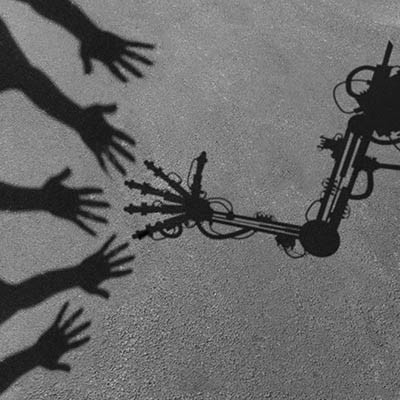
The question is no longer whether to use AI. Everyone is. The real question is what happens when you trust it blindly. We have watched companies treat AI as set-it-and-forget-it and then call us for emergency cleanup. Here are the main pitfalls of over-trusting AI and how to keep your business out of the cautionary-tale column.
The black-box accountability gap
A big risk is losing explainability. When an AI makes a high-stakes call, rejecting a loan or flagging a threat, and nobody on your team can explain why, you are exposed. In a regulated industry, the AI said so is not a legal defense. Lean toward explainable AI, and if you cannot trace the logic, do not trust the output for high-stakes decisions.
Hallucinations and the package attack
Generative AI is confident even when it is dead wrong, and that has moved from a quirk to a security problem. Models sometimes suggest code packages that do not exist, and attackers now do slopsquatting, a term coined by security researcher Seth Larson, registering malicious packages under those exact hallucinated names and waiting for developers to install them. Never push AI-generated code or content to production without a human in the loop.
The decay of critical thinking
Gartner predicts that through 2026, the atrophy of critical-thinking skills from heavy generative-AI use will push 50% of organizations to require AI-free skills assessments. When staff lean on AI to draft every email, summarize every meeting, and solve every glitch, they lose the instinct to notice when the AI is steering them off a cliff. Treat AI like a junior assistant whose work you check, not an oracle.
Data leaks and hidden costs
Paste sensitive data into a public AI tool and you may be leaking trade secrets into a model that serves them back to someone else. A private AI setup keeps your data sandboxed inside your own perimeter. And do not assume AI instantly slashes costs, the sticker price is the tip of the iceberg, with much of the real spend coming after rollout, data cleaning, performance that drifts as conditions change, and cloud and GPU scaling.
AI is a powerful efficiency tool, but it has no intuition, empathy, or accountability. The goal is to capture its productivity without surrendering the human judgment that built your business. Book a call and we will help you use AI safely, with the right guardrails.

The biggest weakness in most networks is not the firewall. It is the people, and attackers know it. They count on your team being busy, stressed, and trying to be helpful, so they manufacture moments where someone clicks first and thinks later. The fix is almost embarrassingly simple. Give people permission to slow down. Call it the three-second rule, a short pause before acting on any message that wants something from you. Here is why that tiny habit punches so far above its weight.

You can have every security tool on the market and still get breached through one tired click. People are where most attacks land, which makes training your team one of the highest-return security moves you can make. The catch is that the way most businesses do it, a once-a-year video everyone clicks through on mute, changes almost nothing. Here is how to build training that actually shifts behavior.

While you are busy shoring up your cybersecurity, it is worth asking what you are doing about the physical side. The risk to your people, your data, and your equipment is real, and the line between physical security and IT has mostly disappeared. Cameras, badge readers, and door controllers all run on your network now, which means they are your problem too. Here is what a modern setup includes and how to handle it.
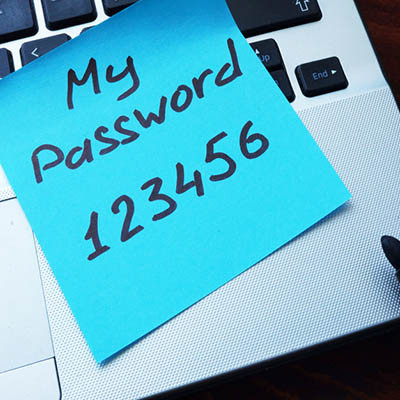
How many of your employees keep company passwords on sticky notes stuck to their monitors? It looks harmless, but anyone walking through the office can read them, including people who should not. Worse, the sticky note is a symptom of a deeper problem in how your business handles passwords. Here is why it happens and the system that actually fixes it.

Clutter builds up everywhere, the junk drawer at home, the back of a closet, and your business network. On a network that clutter has a name, digital cruft, and it is more dangerous than it sounds. All the leftover accounts, unused software, and forgotten data piling up as a side effect of running a business may be your single biggest vulnerability. Here is what it is and why attackers love it.

Smart office technology, connected lighting, thermostats, sensors, cameras, can make a workspace more efficient and more modern. It also quietly changes your risk. Every one of those devices is a small computer on your network, and most of them were not built with security as the priority. You do not have to choose between modern and secure, but you do have to add this tech on purpose. Here is what to watch and how to do it right.

Your smartphone is a computer that happens to fit in your pocket, and it faces the same kinds of threats a laptop does. One of the simplest defenses comes straight from the National Security Agency, which recommends powering your phone off and back on at least once a week. It sounds almost too easy. Here is why it actually helps and what else belongs on your list.

The October 2025 theft of the French crown jewels from the Louvre, around 88 million euros gone in minutes, grabbed headlines for the sheer nerve of it. The more useful story is what came out afterward. By multiple public reports, the museum had been warned for years about security basics it never fixed. The lesson is not really about museums. It is about how often the simple stuff gets ignored until it costs everything.

There is an old saying about a frog in a pot. Drop it in boiling water and it jumps out, but warm the water slowly and it never notices until it is too late. Plenty of businesses treat their technology the same way. The small annoyances get waved off one at a time, until they add up to a real problem. Here are the warning signs worth catching while the water is still warm.

Forget the Halloween costumes. The genuinely scary stuff for a business is the set of cyberthreats trying to take it down, and they do not wait for October. Here are three of the most common, what they actually do, and how to keep them from haunting your operation.
It is easy to read about cyberthreats and nod along. Being ready for one is a different thing. Plenty of businesses know phishing and ransomware exist and still could not survive an actual attack, because knowing the danger is not the same as being prepared for it. Here is the short list that decides whether an incident is a scare or a real disaster.

People reuse passwords because remembering a dozen of them is a pain. The problem is that when any one of those accounts is caught in a data breach, the stolen login can end up for sale on the dark web, and from there it becomes a key someone tries against your business. The dark web sounds like a horror story, but once you understand it, it is manageable. Here is what it is and how to stay ahead of it.

Picture a small business that just spent a fortune on the best security software and a top-tier firewall. Impressive, until someone walks in one night through an unlocked door and takes a hammer to the server sitting in plain sight. All that digital protection, undone by a physical gap. Cybersecurity is essential, but it does nothing to stop a crowbar. Here is the physical side that too many businesses skip.

© 2026 CybertronIT. All rights reserved.Privacy Policy · Sitemap